The Most Important Table in My Microsoft Fabric Environment
This article was originally published on LinkedIn and is archived here on texlytics.com.
Most data engineers love talking about pipelines.
Others love talking about notebooks, Spark, semantic models, or dashboards.
But after building a near-real-time Microsoft Fabric integration framework that ingests dozens of CMiC endpoints every fifteen minutes, I’ve come to a different conclusion:
The most important object in my entire environment isn’t a pipeline. It’s a table.
Not a fact table.
Not a dimension table.
A control table.
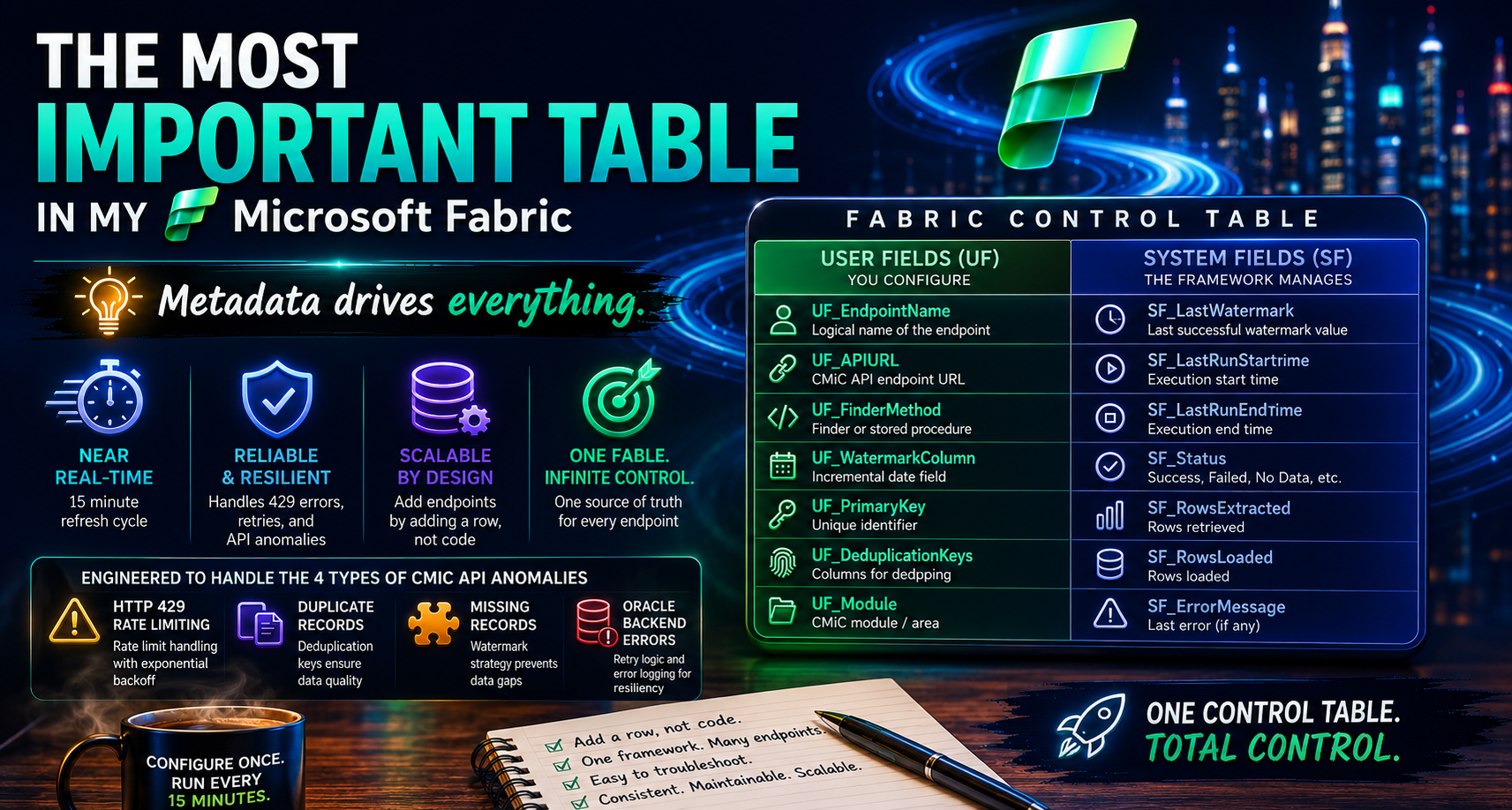
What started as a simple metadata repository evolved into the operational brain of the entire framework. It handles endpoint configuration, watermark management, deduplication strategies, anomaly handling, and onboarding new data sources without requiring changes to the underlying code.
The more complexity I encountered, the more valuable this table became.
In this article, I’ll walk through the design philosophy behind the Fabric Control Table, why I adopted a UF (User Field) and SF (System Field) naming convention, and how a metadata-driven approach helped transform a collection of API integrations into a scalable, maintainable platform.
The Reality of Enterprise Data
Once you move beyond proof-of-concept and into production, data integration becomes less about moving data and more about handling exceptions.
In my case, I encountered:
- Proxy-layer rate limits. Limits enforced cumulatively across every request the framework made, not per endpoint. A job that ran clean in isolation would start failing simply because the endpoints ahead of it had already consumed the budget.
- HTTP 429 responses arriving mid-extraction. Not at the start of a run, where they would be easy to handle, but on page 40 of 60, leaving a partial pull that looked successful if you weren’t counting rows.
- Duplicate and missing records caused by non-deterministic sort order. The API returned pages in a different order on every call. Run the same query twice and a record might appear on page 3 the first time, page 4 the second time, or fall between pages and not appear at all.
- Oracle backend errors surfacing as opaque API failures. Database-level errors wrapped in generic HTTP 500 responses, with no indication of whether the request was retryable.
- Different date fields across endpoints. Some endpoints expose a reliable record-level update timestamp. Others only carry a header-level date that doesn’t change when child records do. A few return null update dates entirely.
- Different primary key structures. One endpoint identifies records with a single key. Another requires a composite of three or four business columns before a row is actually unique.
- Inconsistent API behavior from one module to the next. A filter parameter that works perfectly on one endpoint is silently ignored on another. Some endpoints return everything in one call; others only return data one parent record at a time.
What worked for one endpoint often failed for another. The question quickly became:
How do you build one framework capable of handling dozens of different endpoints without hardcoding everything?
The Answer: Metadata
Instead of embedding logic throughout notebooks and pipelines, I centralized endpoint behavior into a single control table.
Every endpoint receives a configuration record. Some of the fields include:
User-Defined Fields (UF)
These fields tell the framework how an endpoint behaves. Examples include:
- Endpoint name and API URL. The identity of the endpoint and the REST resource the framework should call, such as AP Registered Invoices or AR Payments.
- Finder method. How the endpoint must be queried. Some endpoints accept a date-range filter directly; others only return data for one parent record at a time and have to be fetched in a loop.
- Watermark column. Which date field on this specific endpoint can actually be trusted to detect changes, since that answer differs from one endpoint to the next.
- Extraction mode. Whether the endpoint supports true incremental loading or has to be pulled as a full snapshot every run because its audit dates are unreliable.
- Primary key and deduplication keys. Which column, or combination of columns, makes a record unique, and which keys to use when the API hands back the same record twice.
- Module classification. Whether the endpoint belongs to AP, AR, GL, or Job Costing, which drives downstream routing and reporting.
These values rarely change during execution. They act as configuration settings.
System Fields (SF)
These fields are managed by the framework itself. Examples include:
- Last successful watermark. The exact timestamp the previous run completed through, which becomes the starting point for the next run. If a run fails, the watermark doesn’t advance, and nothing is skipped.
- Processing status. Whether the endpoint is currently running, succeeded, or failed, so a glance at the table tells you the state of the entire framework.
- Execution metadata. Row counts at each stage: how many records were pulled, how many survived deduplication, and how many were actually upserted. When those numbers disagree, that’s the first clue something is wrong.
- Audit information. Last run time, duration, and the most recent error message, captured per endpoint rather than buried in a log file.
These values are continuously updated as the framework runs.
Why This Matters
When a new endpoint needs to be onboarded, I don’t modify code.
I add a row.
The framework reads the metadata and determines:
- Which API to call and how to call it, including any special fetch pattern the endpoint requires.
- Which date field to use for change detection, without assuming every endpoint behaves like the last one.
- How to identify new records by comparing against the stored watermark instead of re-pulling history.
- How to remove duplicates using the dedupe keys defined for that endpoint, not a one-size-fits-all rule.
- How to advance the watermark only after a confirmed successful load, so a failure never creates a silent gap.
The notebook remains unchanged. The behavior changes because the metadata changes. Onboarding a new endpoint went from a development task to a data entry task.
Maintaining the Table Itself
A control table is only as trustworthy as the process that maintains it. The table lives as a Delta table in the Lakehouse, and early on I made a rule: nobody edits it by hand, including me.
Instead, every change flows through a standardized update script. Adding an endpoint, adjusting a watermark column, or changing a deduplication key all run through the same code path: a scripted merge against the Delta table rather than a manual edit.
That standardization pays off in three ways:
- Changes are repeatable. The same script that updates the table in development updates it in production, so configuration never drifts between environments.
- Changes are safe. The script validates a configuration record before it lands. A typo in a watermark column name gets caught at update time, not three runs later when records quietly stop arriving.
- Changes are auditable. Because it’s a Delta table, every version is preserved. When a run misbehaves, I can see exactly what configuration was active at the time, and what changed since.
The framework is metadata-driven, and the metadata itself is maintained with the same discipline as the code.
The Unexpected Benefit
The biggest benefit wasn’t speed. It was maintainability.
When an issue occurs, I can inspect a single record and immediately understand:
- Which endpoint is being processed and where it sits in the run.
- Which watermark is being used, so I can tell instantly whether a missing record is a watermark problem or an API problem.
- Which keys define uniqueness, which is usually the answer when row counts don’t match expectations.
- Which logic is being applied, incremental or snapshot, filtered or full fetch, without opening a single notebook.
Troubleshooting that once required reviewing code now requires reviewing metadata.
A Lesson Learned
Many organizations invest heavily in pipelines and transformations while overlooking the operational layer that keeps everything running.
For me, the control table became that operational layer. The more endpoints I added, the more valuable the table became. What started as a convenience eventually became the foundation of the entire ingestion framework.
Sometimes the most important object in a modern data platform isn’t the pipeline, the notebook, or the dashboard.
Sometimes it’s just a table that tells everything else what to do.
What’s the most valuable behind-the-scenes object in your data platform — the one that never shows up on the architecture diagram?